
Running Fedora on architectures you don't own
I needed (i 100% need them btw frfr) ppc64le and riscv64 machines for build testing. Buying either in Türkiye is basically not happening .d, so I made three Fedora 44 VMs instead: x86_64, ppc64le, and riscv64.
My Mac is arm64, which means all three run through software emulation. It is not fast, but it works, and I no longer need to hunt for a mysterious PowerPC server on sahibinden (does not exist btw).
Cloud images save a lot of pain
Use Fedora Cloud Base images. They are already installed, so you can skip sitting in an installer three times. The only catch is that there is no user or password yet.
That is what cloud-init is for. Make a user-data file like this:
#cloud-config
users:
  - name: your_name
    sudo: ALL=(ALL) NOPASSWD:ALL
    shell: /bin/bash
    lock_passwd: false
    ssh_authorized_keys:
      - ssh-ed25519 AAAA... [email protected]
chpasswd:
  expire: false
  users:
    - { name: your_name, password: fedora, type: text }
ssh_pwauth: true
There are a few tiny gotchas because of course there are:
- The first line must be exactly
#cloud-config. It looks like a comment, but it is doing actual work. - The seed image volume label must be
CIDATA. - Keep
expire: falseunless you want Fedora to demand a password change on the first login.
I keep both an SSH key and a console password. The password is useful when networking decides it needs five more minutes to discover DHCP.
You also need a meta-data file:
instance-id: fedora-test-01
local-hostname: fedora-test
Change the instance-id when you want cloud-init to run again. If you edit
user-data but keep the same ID, cloud-init sees it and says “already did that”.
Making the seed ISO on macOS
macOS does not have cloud-localds, very cool. hdiutil still gets the job done:
hdiutil makehybrid -o seed.iso seed -iso -joliet -default-volume-name CIDATA
The seed directory should contain user-data and meta-data. Check the result with:
file seed.iso
It should report an ISO 9660 filesystem with the CIDATA label.
If you changed the config and nothing happened, bump the instance ID and rebuild the ISO. You can also run this inside the guest:
sudo cloud-init clean --logs --reboot
Resize the disk before booting
The stock cloud images are around 5 GB, which disappears very quickly after a few packages. Resize them before the first boot:
qemu-img resize image.qcow2 40G
cloud-init grows the partition during boot. qcow2 is sparse, so it does not instantly eat 40 GB from the host disk.
UEFI needs its own writable variables file
x86_64 and riscv64 boot through edk2. They need a read-only firmware code file and a writable variable store. The shipped variable store lives in a system directory, so copy the matching one into each VM directory first.
For x86_64:
FW=$(dirname "$(readlink -f "$(command -v qemu-system-x86_64)")")/../share/qemu
cp "$FW/edk2-i386-vars.fd" vars.fd
chmod u+w vars.fd
For riscv64:
FW=$(dirname "$(readlink -f "$(command -v qemu-system-riscv64)")")/../share/qemu
cp "$FW/edk2-riscv-vars.fd" vars.fd
chmod u+w vars.fd
Yes, the x86_64 guest uses edk2-i386-vars.fd. There is no separately named x86_64
vars file. ppc64le avoids this whole side quest because pseries boots with SLOF.
RISC-V wants everything spelled out
The riscv64 virt board is a little picky. -drive ...,if=virtio does not work here.
Define the file with if=none, give it an ID, then connect it using
virtio-blk-device.
The network device is virtio-net-device, not virtio-net-pci. The two pflash files
also need unit=0 and unit=1. Miss one of those and edk2 may just sit there looking
dead, which is extremely helpful.
Making TCG slightly less cooked
Use this for the emulated guests:
-accel tcg,thread=multi,tb-size=1024
It enables multithreaded translation and gives QEMU a 1 GB translation block cache. Booting still takes a few minutes, but the machines are usable afterwards.
Forward a different host port to port 22 on each guest. SSH is much nicer than living inside the serial console while a riscv64 terminal redraws one thought at a time.
How I run them
I keep one run.sh in each VM directory. These are the actual commands I use on
macOS, with serial output in the terminal.
x86_64
#!/usr/bin/env bash
set -euo pipefail
cd "$(dirname "$0")"

IMG=Fedora-Cloud-Base-Generic-44-1.7.x86_64.qcow2
FW=$(dirname "$(readlink -f "$(command -v qemu-system-x86_64)")")/../share/qemu

exec qemu-system-x86_64 \
  -machine q35 -cpu max -smp 4 -m 8G \
  -accel tcg,thread=multi,tb-size=1024 \
  -drive if=pflash,format=raw,readonly=on,file="$FW/edk2-x86_64-code.fd" \
  -drive if=pflash,format=raw,file=vars.fd \
  -drive file="$IMG",if=virtio,format=qcow2 \
  -drive file=seed.iso,if=virtio,format=raw,media=cdrom \
  -netdev user,id=n0,hostfwd=tcp::2223-:22 \
  -device virtio-net-pci,netdev=n0 \
  -nographic
ppc64le
#!/usr/bin/env bash
set -euo pipefail
cd "$(dirname "$0")"

IMG=Fedora-Cloud-Base-Generic-44-1.7.ppc64le.qcow2

exec qemu-system-ppc64 \
  -machine pseries -cpu power9 -smp 4 -m 8G \
  -accel tcg,thread=multi,tb-size=1024 \
  -drive file="$IMG",if=virtio,format=qcow2 \
  -drive file=seed.iso,if=virtio,format=raw,media=cdrom \
  -netdev user,id=n0,hostfwd=tcp::2222-:22 \
  -device virtio-net-pci,netdev=n0 \
  -nographic
riscv64
#!/usr/bin/env bash
set -euo pipefail
cd "$(dirname "$0")"

IMG=Fedora-Cloud-Base-Generic-44-20260604.0.riscv64.qcow2
FW=$(dirname "$(readlink -f "$(command -v qemu-system-riscv64)")")/../share/qemu

exec qemu-system-riscv64 \
  -machine virt -cpu rv64 -smp 7 -m 8G \
  -accel tcg,thread=multi,tb-size=1024 \
  -drive if=pflash,format=raw,unit=0,readonly=on,file="$FW/edk2-riscv-code.fd" \
  -drive if=pflash,format=raw,unit=1,file=vars.fd \
  -device virtio-blk-device,drive=hd0 \
  -drive file="$IMG",id=hd0,if=none,format=qcow2 \
  -device virtio-blk-device,drive=cd0 \
  -drive file=seed.iso,id=cd0,if=none,format=raw \
  -netdev user,id=n0,hostfwd=tcp::2224-:22 \
  -device virtio-net-device,netdev=n0 \
  -nographic
Make scripts executable (if you use) and start it:
chmod +x run.sh
./run.sh
Once SSH is up, connect using the port for that VM:
ssh -p 2223 [email protected]  # x86_64
ssh -p 2222 [email protected]  # ppc64le
ssh -p 2224 [email protected]  # riscv64
Press Ctrl+A, then x to leave QEMU when using -nographic.
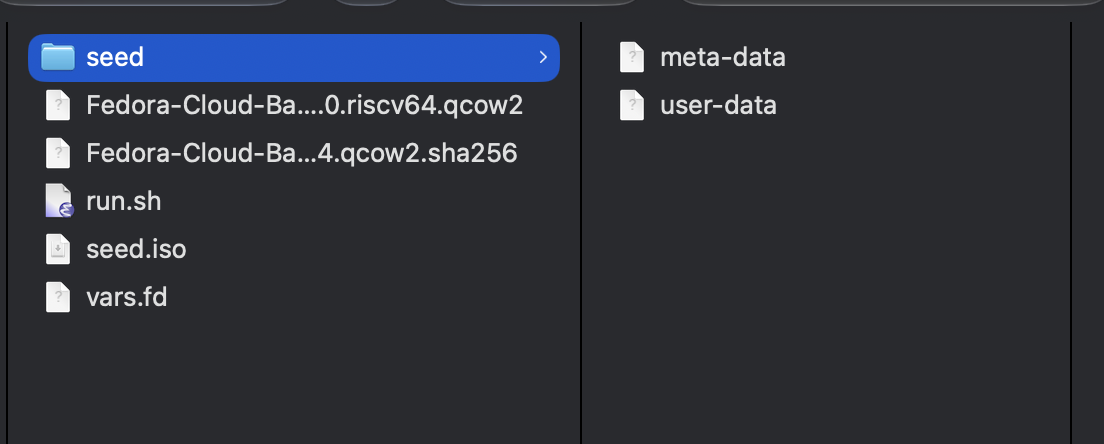
At the end file structure should look like this:
The annoying part
Most mistakes here did not produce a useful error. The VM just booted wrong or cloud-init quietly skipped everything. If something looks cursed, check these first:
- Is the volume label
CIDATA? - Did you change the
instance-id? - Does each pflash file have the correct unit number?
- Are you using the correct virtio device type for the machine?
Those four checks saved me from reading a lot of logs that had nothing useful to say.